iOS Policy — Application Restrictions
Updated on Jun 5, 2026 4 Minutes to read
The Apps tab within an iOS policy gives IT administrators granular control over which Apple system applications and services are permitted on managed iPhones and iPads. These restrictions allow organizations to disable non-essential, distracting, or potentially insecure apps — keeping corporate iOS devices focused on business use.
Click to zoom
Browser & Media Controls
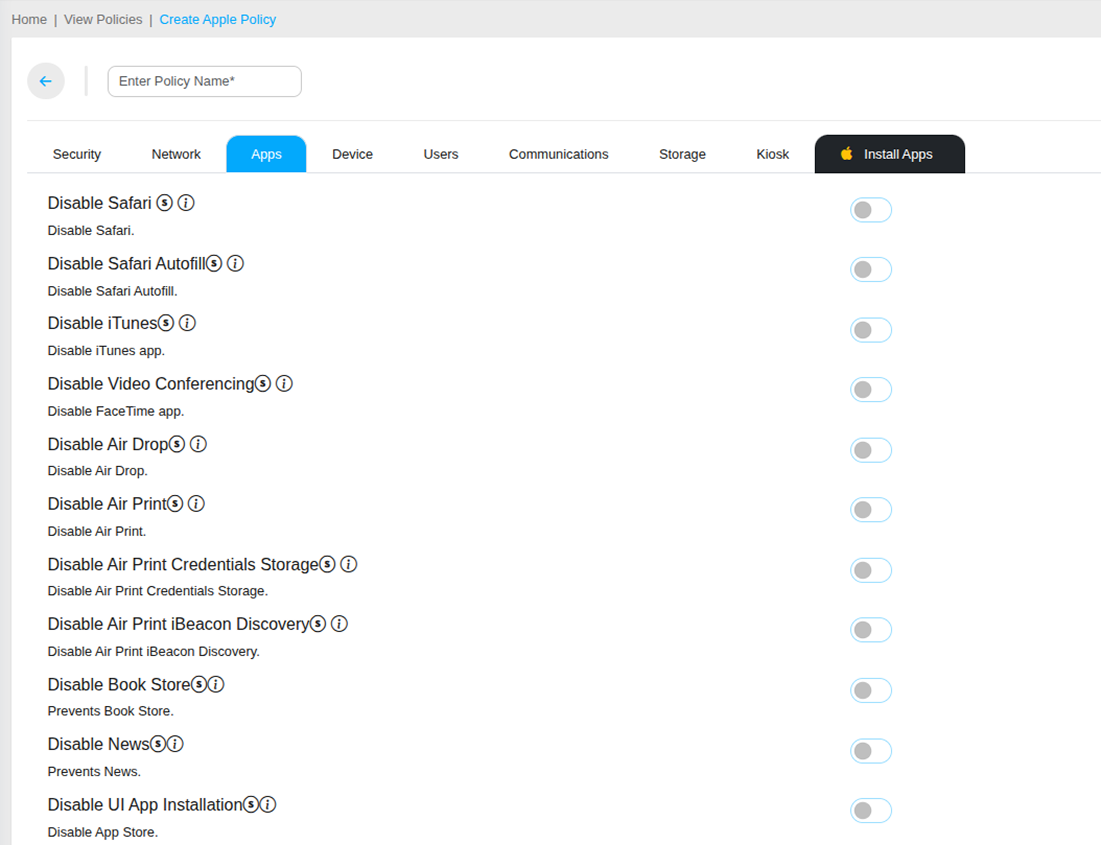
- Disable Safari — Disables Apple's Safari browser entirely on the managed iOS device. Use this to enforce the use of a specific managed browser or to restrict general internet browsing on corporate devices.
- Disable Safari Autofill — Prevents Safari from automatically filling in forms, usernames, passwords, and payment information. Recommended for compliance environments where autofill of sensitive data poses a security risk.
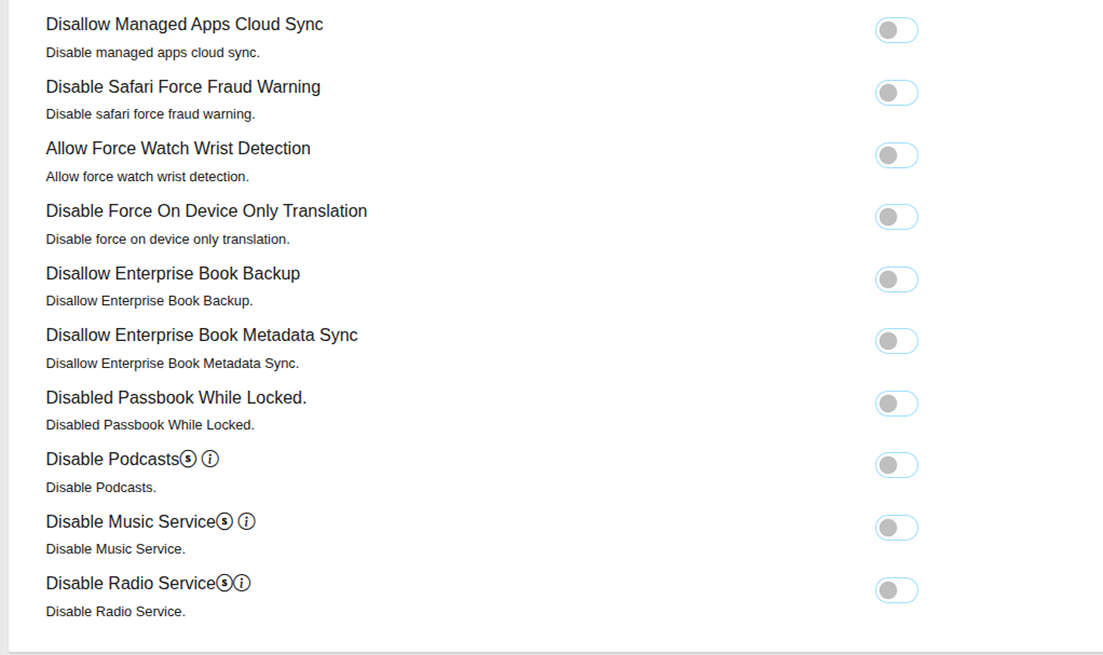
- Disable Safari Force Fraud Warning — Disables Safari's built-in fraudulent website warning system.
- Disable iTunes — Disables the iTunes Store app, preventing users from browsing, purchasing, or downloading media content.
- Disable Music Service — Disables Apple Music on the managed iOS device.
- Disable Radio Service — Disables Apple's internet radio services on the device.
- Disable Podcasts — Disables the Podcasts app on managed iOS devices.
- Disable News — Prevents access to the Apple News app on corporate devices.
App Installation & Update Controls
- Disable UI App Installation — Disables the App Store entirely on the managed iOS device. Users cannot browse, search, or install any applications from the App Store. Apps can only be deployed through MobiHeal's managed Install Apps process.
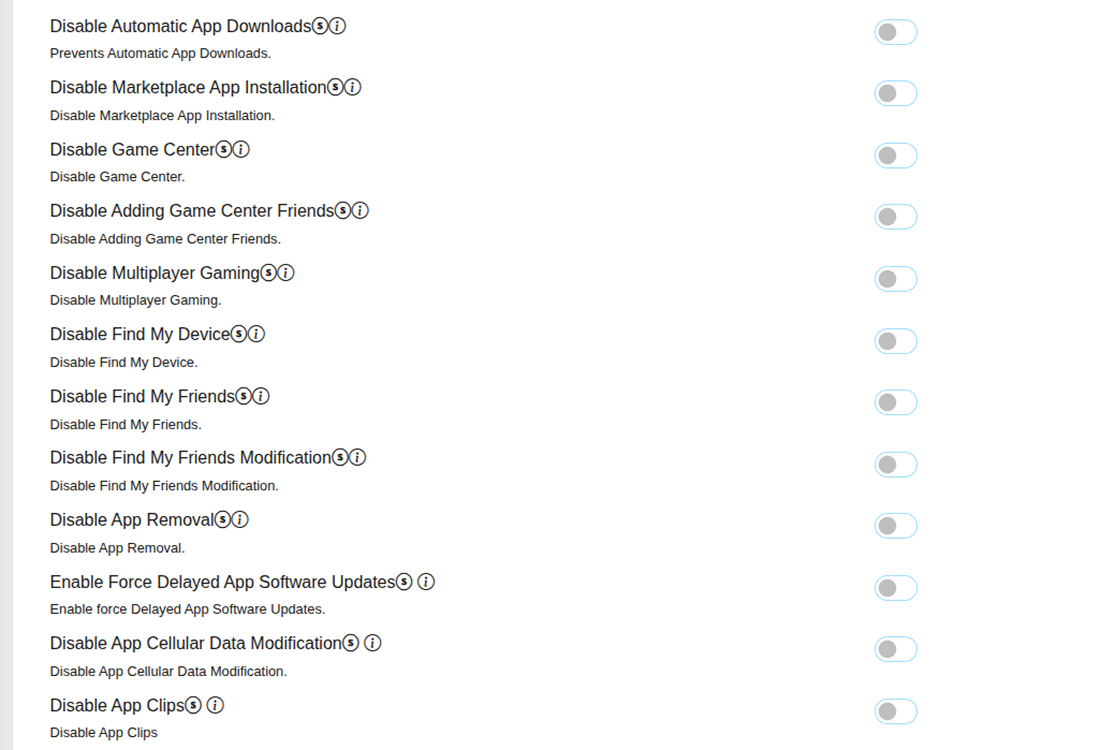
- Disable Automatic App Downloads — Prevents apps purchased or downloaded on other Apple devices linked to the same Apple ID from automatically downloading on the managed corporate device.
- Disable Marketplace App Installation — Prevents installation of apps from alternative app marketplaces available on iOS outside of the official App Store.
- Disable App Removal — Prevents users from deleting any installed application from the managed iOS device — protecting corporate apps from being accidentally or intentionally removed.
- Enable Force Delayed App Software Updates — Defers app updates from appearing on the managed device for a configured period, giving IT time to test new app versions before they reach the fleet.
- Disable App Cellular Data Modification — Prevents users from changing which apps are permitted to use cellular data, ensuring corporate data usage policies remain in force.
- Disable App Clips — Prevents App Clips — lightweight mini-apps that can be accessed via NFC, QR codes, or web links — from running on the managed device.
- Disallow Managed Apps Cloud Sync — Prevents managed apps from syncing their data to iCloud, keeping corporate app data on-device and within controlled storage only.
Click to zoom
Click to zoom
Sharing & Connectivity App Controls
- Disable AirDrop — Prevents files and data from being shared or received via AirDrop on the managed iOS device. Recommended for corporate devices to prevent unauthorized data transfer to personal devices nearby.
- Disable Force AirDrop Unmanaged — Prevents managed corporate content from being shared to unmanaged personal devices via AirDrop while still allowing sharing between managed devices.
- Disable Video Conferencing (FaceTime) — Disables Apple's FaceTime video and audio calling app on the managed device.
- Disable AirPrint — Prevents the device from using Apple's AirPrint wireless printing feature.
- Disable AirPrint Credentials Storage — Prevents AirPrint from saving printer credentials and authentication details on the device.
- Disable AirPrint iBeacon Discovery — Prevents the device from discovering AirPrint printers via Bluetooth iBeacon signals.
- Disable Force AirPlay Outgoing Requests Pairing Password — Disables the requirement for a pairing password when the device initiates AirPlay streaming to another device.
Entertainment & Social App Controls
- Disable Game Center — Disables Apple's Game Center social gaming platform on the managed iOS device.
- Disable Adding Game Center Friends — Prevents users from adding friends within Game Center even if the app itself is not fully disabled.
- Disable Multiplayer Gaming — Prevents users from participating in multiplayer games through Game Center on the managed device.
- Disable Book Store — Prevents access to Apple's Books Store for purchasing or downloading ebooks and audiobooks.
- Disable Find My Device — Prevents the device from appearing in Apple's Find My network. Disable this with caution — it removes the user's ability to locate a lost device through their personal Apple ID.
- Disable Find My Friends — Disables the Find My Friends feature that allows sharing of location with contacts.
- Disable Find My Friends Modification — Prevents users from modifying Find My Friends settings.
Enterprise & Watch Controls
- Disallow Enterprise Book Backup — Prevents enterprise-distributed ebooks from being backed up to iCloud.
- Disallow Enterprise Book Metadata Sync — Prevents notes and bookmarks from enterprise-distributed books from syncing to iCloud.
- Disable Passbook While Locked — Prevents Passbook (Wallet) notifications and content from appearing on the lock screen.
- Allow Force Watch Wrist Detection — Enforces Apple Watch wrist detection — the watch will lock when removed from the wrist, requiring passcode re-entry.
- Disable Force On Device Only Translation — Disables the requirement that translation processing must remain on-device, allowing the translation system to use cloud services.