Device Details & Diagnostics
Clicking on any device's Serial Number in the Managed Devices table opens its individual device dashboard. This view gives you a complete diagnostic picture of that device — from real-time hardware stats and network connectivity to installed applications and pushed content status.
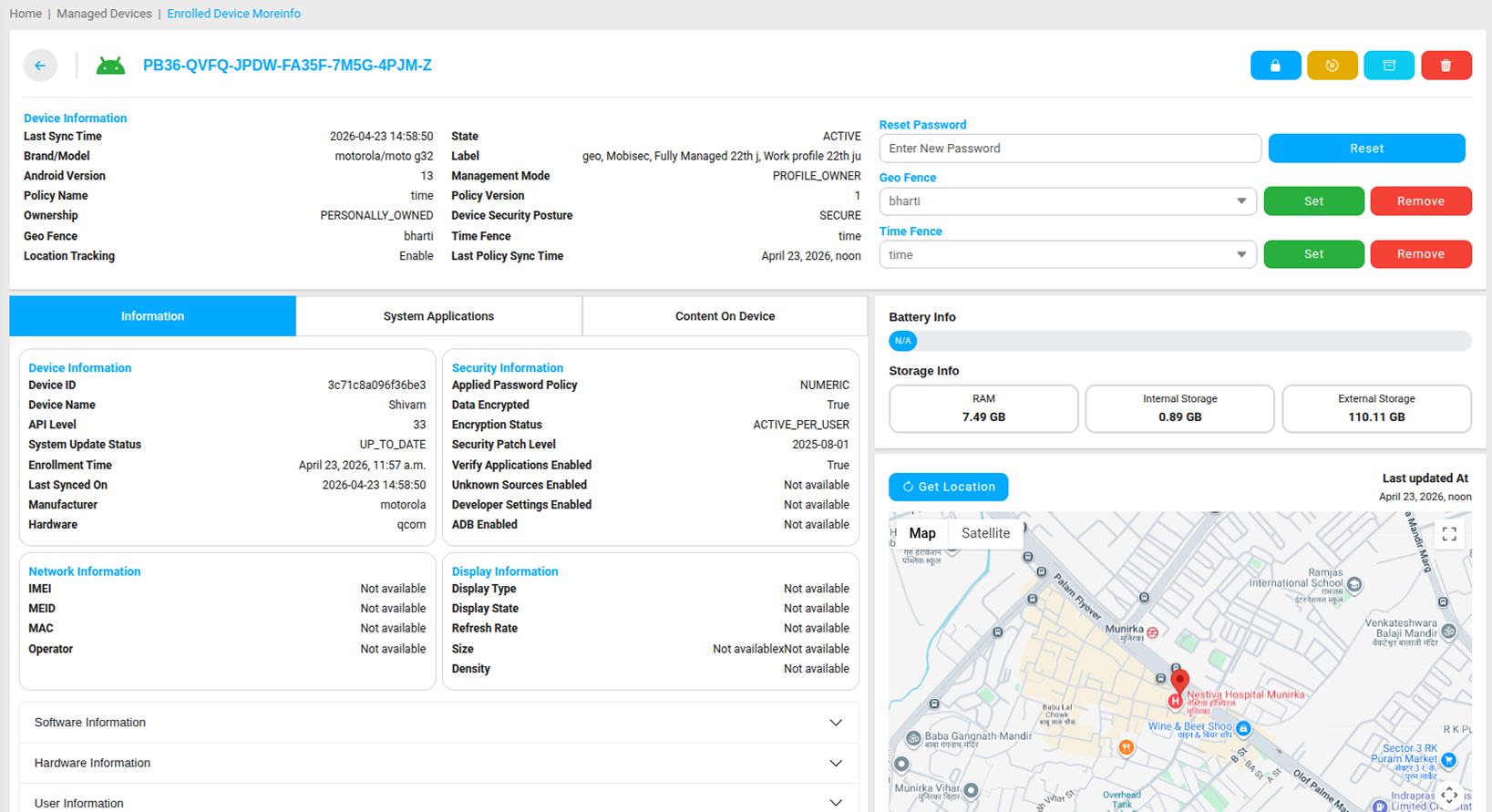
Hardware & System Information
- RAM — Real-time RAM usage showing total and available memory.
- Internal Storage — Current internal storage used and available.
- External Storage — SD card or external storage capacity if present.
- Battery — Current battery charge percentage. Battery level is available on fully managed devices only.
- Device Kernel Version — The Linux kernel version running on the device.
- Bootloader Version — The current bootloader build installed on the device.
- Android Build Number — The specific Android build running on this device.
- Android Build Time — The timestamp of when the current build was compiled.
- Device Build Signature — A unique cryptographic hash identifying the device's software integrity.
- Android Device Policy Version — The version of the Android Device Policy app managing the device.
- Primary Language — The primary language and region configured on the device.
Hardware Component Information
- Device Baseband Version — The firmware version of the device's cellular modem.
- Battery Shutdown Temperature — The temperature threshold at which the battery shuts down to protect hardware.
- Battery Throttling Temperature — The temperature at which battery performance is throttled.
- CPU Shutdown and Throttling Temperatures — Thermal limits for the processor.
- GPU Shutdown and Throttling Temperatures — Thermal limits for the graphics processor.
- Skin Shutdown Temperature — The device surface temperature threshold for shutdown.
Network Information
- IP Address — The current local IP address assigned to the device.
- MAC Address — The unique hardware network identifier of the device.
- Current SSID — The Wi-Fi network the device is currently connected to.
Security Information
- Encryption Status — Confirms whether the device storage is fully encrypted.
- Active Policy — Shows the name of the security policy currently applied to the device.
User Information
- User ID — The unique identifier of the Google account or user profile associated with the device.
- Name — The display name of the assigned user if available.
- Email — The email address linked to the device.
- Phone Number — The contact number associated with the user if available.
System Applications
The System Applications section lists every package installed on the device, including both system apps and managed apps deployed through MobiHeal. Each entry shows the package name and version number — for example, com.android.chrome version 120.0.6099. Use this to verify that required apps are installed and running the correct version.
Content on Device
This section shows the status of every file that has been pushed to the device through Content Management — including whether the file was successfully delivered, is pending, or failed to install.
Device Location
You can retrieve the current GPS location of the device directly from the device detail view. This gives you a point-in-time location snapshot without needing to navigate to the Location Tracking module.
For historical movement paths, see Location Tracking → /help-center/location-tracking
Non-Compliance Details
If the device is violating any rules defined in its assigned policy, the Non-Compliance Details section will list each violation clearly — showing what rule is being broken and what action MobiHeal has taken or will take in response.