Bulk Device Operations
Instead of managing devices one at a time, MobiHeal lets you select multiple devices and perform actions on all of them simultaneously. This is essential for large fleet management — whether you are rolling out a new policy, broadcasting an urgent message to field teams, or exporting a compliance report.
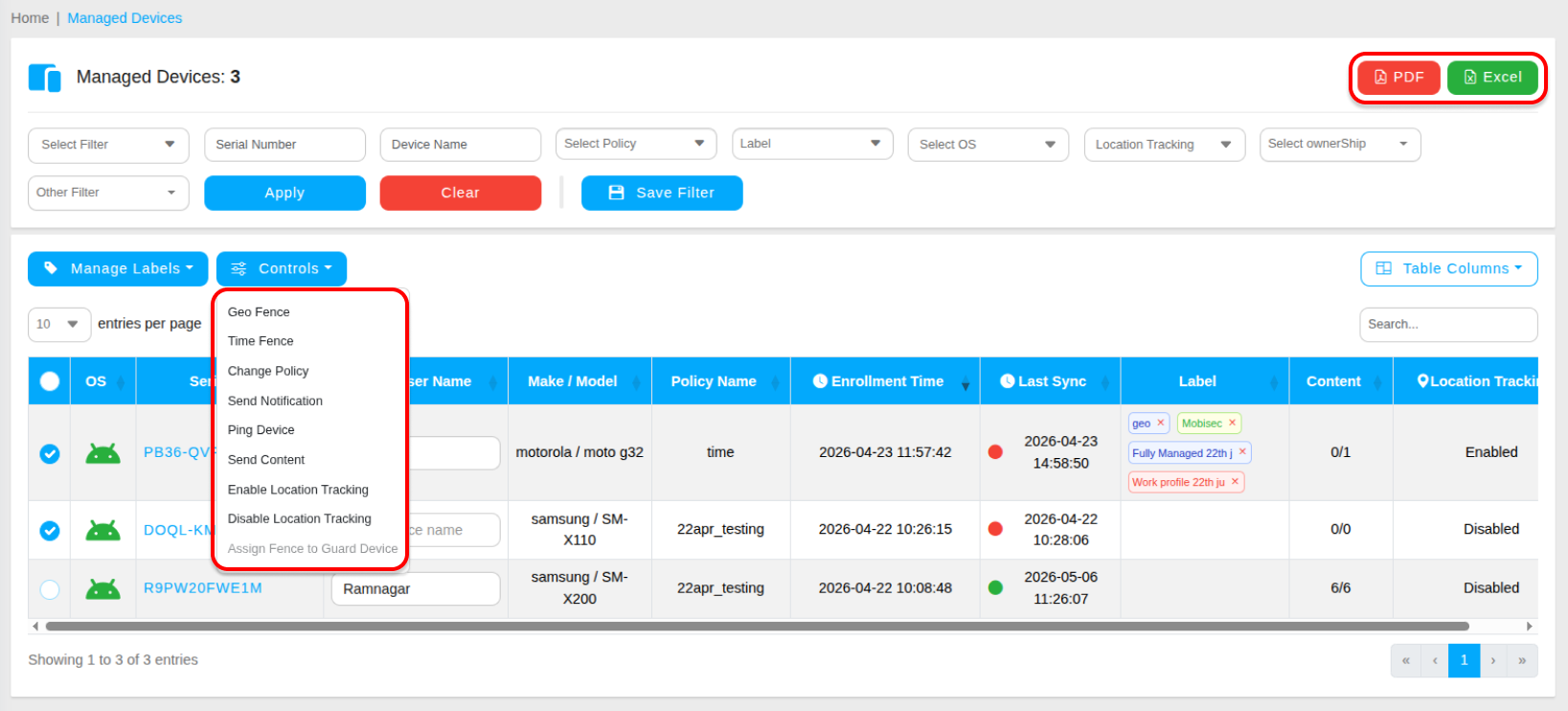
How to Select Devices
In the Managed Devices table, check the boxes on the left side of each device row you want to include. You can select individual devices, or use the header checkbox to select all visible devices at once. Once devices are selected, the Controls menu becomes active in the top bar.
Policy & Compliance Actions
Change Policy
Instantly switch all selected devices to a different security profile. The new policy will be pushed to all selected devices the next time they sync with the server — or immediately if they are online.
Set Geo / Time Fence
Apply a previously created geofence or time fence to all selected devices in one action. This is useful when deploying a new location or schedule restriction across an entire department or team.
Communication Actions
Send Notification
Broadcast a custom message directly to the screens of all selected devices. Enter a Title and Body for the message — for example, a maintenance reminder or an urgent IT alert like "Please contact IT immediately." The notification appears on the device screen in real time.
Ping Device
Force all selected devices to check in with the MobiHeal server immediately. This is useful for refreshing the Last Sync status of devices that appear stale in the table, or confirming that devices are online and reachable.
Push Content
Send specific files directly to all selected devices from the context menu. Select the file from your Content Management catalog — for example, a updated Datasheet.pdf or a training document — and it will be pushed to all selected devices immediately.
Data Management Actions
Export to Excel/PDF
Download a detailed .xlsx and pdf report of all selected devices. You can filter the export by date range to generate time-specific fleet snapshots for compliance reporting, audits, or management reviews.