Device Inventory & Filtering
The Managed Devices table gives you a real-time view of every enrolled device in your fleet. With advanced filtering options and customizable columns, you can cut through a large fleet and find exactly the device or group of devices you need in seconds.
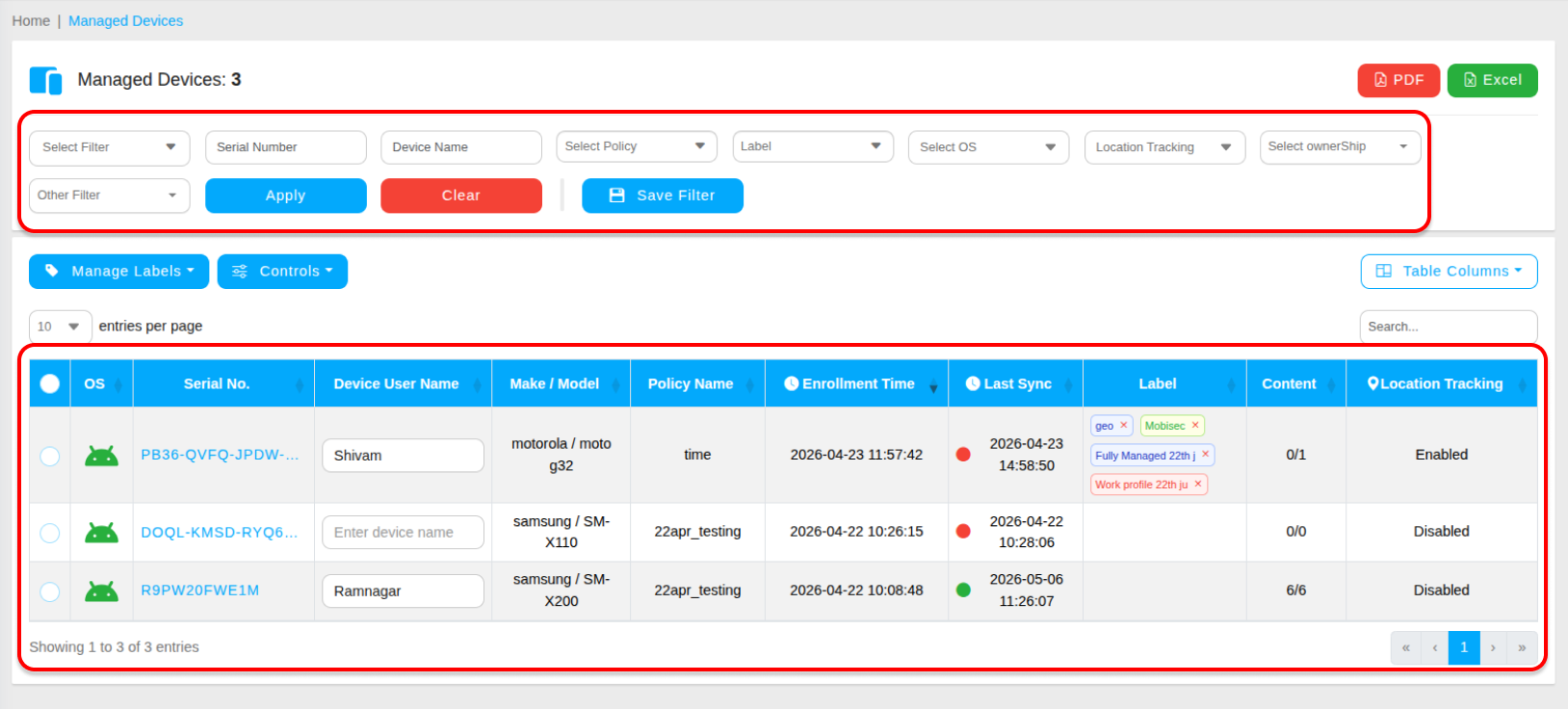
Available Filter Options
Use the filter bar at the top of the table to narrow down your device list. You can filter by any combination of the following criteria:
- Serial Number / Device Name — Locate a specific piece of hardware directly.
- Policy — View all devices currently assigned to a specific security profile.
- Label — Filter by custom organizational tags you have created.
- OS — Filter by operating system type or version.
- Location Tracking — Filter devices by their location tracking status.
- Ownership — Filter by corporate-owned or personally-owned (BYOD) devices.
- Geofencing — Filter devices assigned to a specific geofence.
- Time Fencing — Filter devices assigned to a specific time fence schedule.
- Battery — Filter devices by battery level to identify low-battery units in the field.
- Hardware — Filter by hardware specifications.
- Manufacturer — Filter by device manufacturer.
- Model — Filter by specific device model.
- IMEI — Locate a device by its unique IMEI number.
- Brand — Filter by device brand.
Table Columns
The device table displays the following information columns by default, giving you at-a-glance status for every enrolled device:
- OS — The operating system running on the device.
- Serial No. — The unique hardware serial number.
- Device User Name — The name of the assigned user.
- Make / Model — The manufacturer and model of the device.
- Policy Name — The security policy currently applied.
- Enrollment Time — When the device was enrolled into MobiHeal.
- Last Sync — The last time the device checked in with the server.
- Label — Any organizational labels assigned to the device.
- Content — Status of files pushed to the device.
- Location Tracking — Whether location tracking is active on the device.
- IMEI — The device's unique IMEI identifier.
- Battery — Current battery percentage.
- Ownership — Whether the device is corporate-owned or personal.
- Hardware — Hardware specification summary.
- Email — The email address associated with the device user.
Customizing Table Columns
Not every column may be relevant to your workflow. MobiHeal allows you to add or remove columns from the table view to show only the information that matters to your team. Click the column customization button to toggle columns on or off — your preference is saved for your admin session.