Geofencing & Location Services Overview
MobiHeal goes beyond basic device management by offering advanced location-based and time-based automation tools for Android devices. Instead of manually switching policies when employees move between locations or shift hours change, MobiHeal does it automatically — ensuring your security posture always matches the real-world context of each device without any IT intervention.
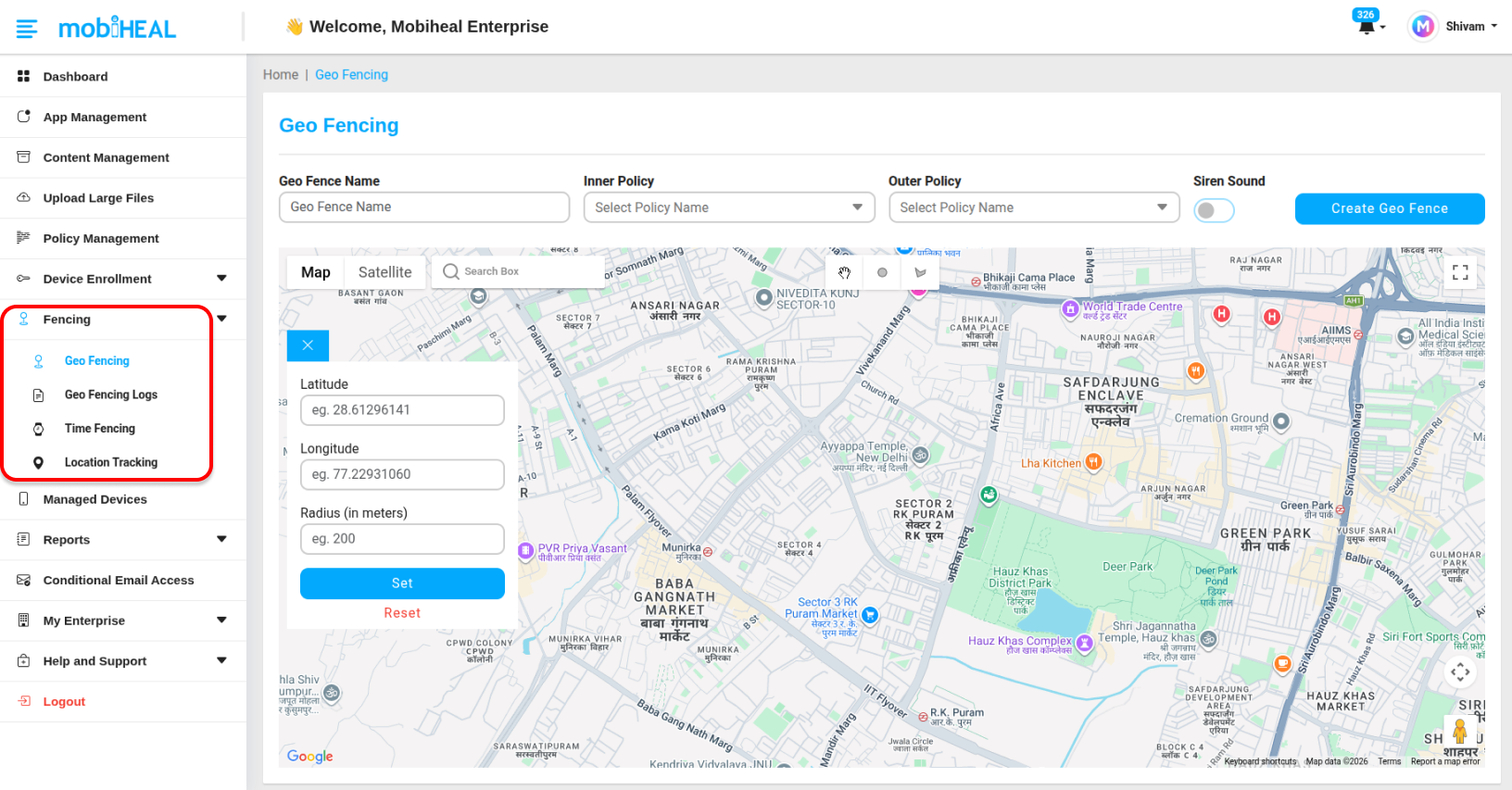
How to Access Location Services
All location and time-based management modules are accessible directly from the left sidebar of the MobiHeal console. Each module has its own dedicated screen:
- Geofencing — Click Geofencing in the left sidebar to create and manage virtual geographic boundaries and view geofence event logs.
- Time Fencing — Click Time Fencing in the left sidebar to create and manage time-based policy schedules for shift workers and business hours enforcement.
- Location Tracking — Click Location Tracking in the left sidebar to view and audit historical device movement paths on the map.
What You Can Do
- Automatically switch Android device policies when a device enters or leaves a defined geographic boundary.
- Enforce stricter security settings inside office premises without any manual IT intervention.
- Schedule policy changes based on shift start and end times for time-based access control.
- Audit historical Android device movement to review where a device has been over any selected time period.
- Review detailed geofence event logs to see exactly when and where each policy switch occurred, with filtering by date range and event type.
Available Modules
Geofencing
Create virtual geographic boundaries around any physical location. MobiHeal automatically applies different Android policies when a device enters or exits the defined zone — for example, enabling the camera inside the office and blocking it the moment a device leaves the perimeter. All boundary crossing events are recorded in the Geofence Logs for audit purposes.
Learn how to set up Geofencing and view Geofence Logs → /help-center/android-geofencing
Time Fencing
Automate Android policy changes based on the time of day. Define work hours and MobiHeal will switch to a stricter policy the moment a shift ends — no manual action required from IT or the employee.
Learn how to configure Time Fencing → /help-center/android-time-fencing
Location Tracking
View a historical map of where any managed Android device has been over a selected time period. Ideal for auditing field teams, verifying delivery routes, or investigating device misuse.
Learn how to view Device Location Tracking → /help-center/android-location-tracking
How These Modules Work Together
These modules are designed to work as a complete location management system. A typical deployment might use Geofencing to enforce strict policies outside the office, Time Fencing to lock devices down after business hours, and Location Tracking to audit field team activity — all running simultaneously and automatically without any daily IT involvement.