Application Restrictions
The Apps tab governs the installation lifecycle and permission behaviors for all applications on the managed Android device. These settings ensure only IT-approved software runs on corporate devices, and that app permissions are handled consistently across the entire fleet without relying on individual user decisions.
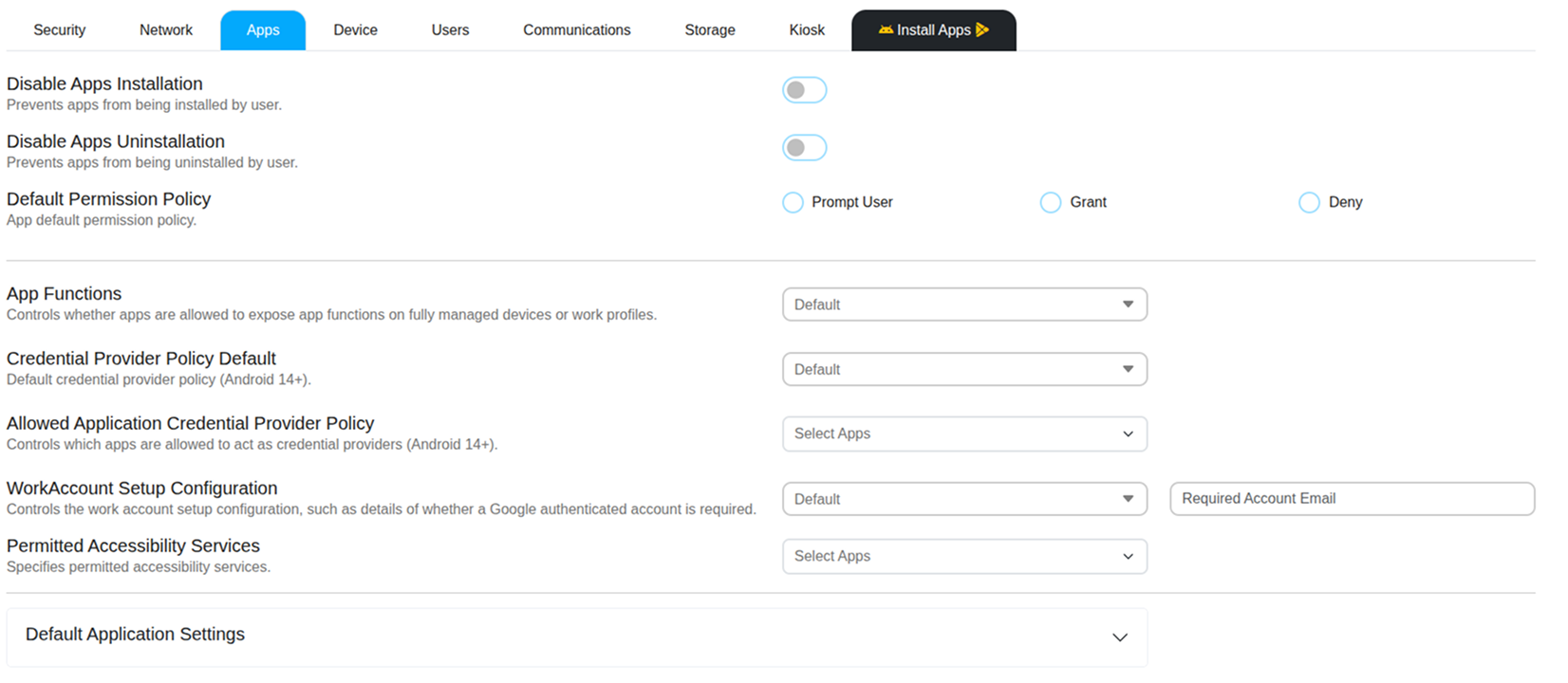
Installation Controls
Disable App Installation
Prevents users from manually installing Android applications from any source other than the Managed Google Play Store configured by IT. This blocks sideloading of APK files and prevents unauthorized software from being added to the device outside the IT-approved catalog.
Disable App Uninstallation
Prevents users from removing any installed application from the Android device. Use this to protect critical business apps — such as the MobiHeal agent, communication tools, or security software — from being accidentally or deliberately deleted by the end user.
Default Permission Policy
Defines how the Android device handles all application permission requests globally — for example, when an app requests access to the camera, microphone, contacts, or location. Instead of letting each user decide individually, you enforce a consistent behavior across all apps on all devices assigned to this policy.
Prompt User
The user is asked to grant or deny each permission request individually when an app first requests it. This is the standard Android device behavior and gives users control over their privacy.
Grant
All permission requests are automatically granted without any user interaction or prompt. This is the recommended setting for kiosk devices or fully managed corporate Android hardware where permission prompts would disrupt workflows or confuse non-technical users.
Deny
All permission requests are automatically blocked. Users cannot grant any app access to protected device resources regardless of what the app requests. Use this in high-security environments where app access to hardware or data must be strictly controlled.
App Functions
Controls whether applications are allowed to expose app functions on fully managed devices or work profiles. App functions can include integrations, background services, and other system-level capabilities that interact with the device environment. Restricting these functions can improve device security and prevent apps from accessing advanced features that are not required for business operations.
Credential Provider Policy
Credential Provider Policy Default (Android 14+)
Defines the default behavior for credential providers on devices running Android 14 or later. Credential providers are responsible for managing authentication credentials such as passwords, passkeys, or other secure login mechanisms used by applications.
Allowed Application Credential Provider Policy (Android 14+)
Specifies which applications are permitted to act as credential providers on the device. By restricting credential provider access to approved applications, organizations can ensure that only trusted password managers or authentication tools handle sensitive login credentials.
Work Account Setup Configuration
Controls how work accounts are configured during device setup or work profile provisioning. Administrators can define whether a Google-authenticated work account is required and can enforce a specific account email to ensure the device is associated with an authorized enterprise user.
Permitted Accessibility Services
Specifies which applications are allowed to run accessibility services on the managed Android device. Accessibility services can monitor screen content and user interactions to provide assistive features. Restricting accessibility services to trusted applications helps protect sensitive information and prevents potentially malicious apps from accessing device activity.
Default Application Settings
Application Type
Allows administrators to define default settings based on the type of application installed on the device. By selecting an application type, IT administrators can standardize how certain categories of apps behave across managed devices and maintain consistent operational policies.