Network Configuration — Wi-Fi, VPN & Advanced Controls
Beyond restricting network modifications, MobiHeal allows you to actively pre-configure corporate Wi-Fi networks so Android devices connect automatically, enforce Always-On VPN to secure all data traffic, and control advanced radio states to ensure devices always maintain the right connectivity for your organization.
Pre-Configuring Corporate Wi-Fi Networks
Instead of asking employees to manually enter Wi-Fi passwords on their Android devices, you can pre-configure corporate networks directly in the policy. When the policy is applied, devices connect automatically the moment they are in range — no user action required.
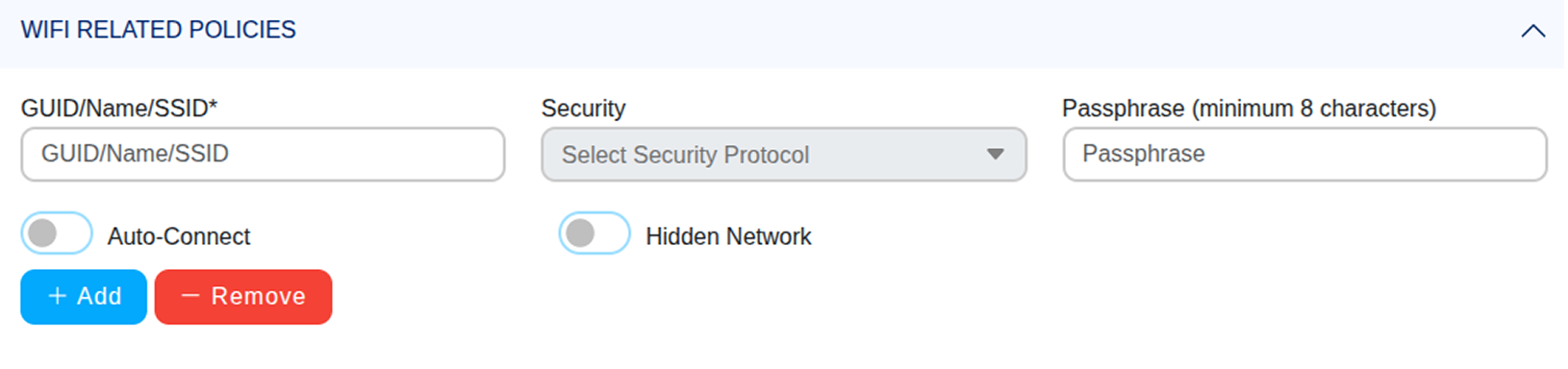
Click the + Add button in the Wi-Fi Related Policies section to define a new network.
SSID
Enter the exact network name as broadcast by your router. The SSID must match precisely — including capitalization and spacing. An incorrect SSID will prevent the Android device from finding the network.
Security Protocol
Select the authentication method used by your router. Most corporate networks use WPA or WPA2. Match this exactly to your router's actual security configuration.
Passphrase
Enter the Wi-Fi password — minimum 8 characters. The passphrase is stored securely and pushed to Android devices without the user ever seeing or needing to enter it.
Auto-Connect
Enable this to ensure the Android device connects immediately and automatically whenever the configured network is in range. Recommended for corporate office networks.
Hidden Network
Enable this if your router does not publicly broadcast its SSID. The Android device will actively probe for this specific network instead of waiting to detect it passively.
VPN Configuration
Enforce secure tunneling for all Android device data traffic using Always-On VPN — ensuring no data leaves the device unencrypted, even on untrusted public networks.
VPN Application
Select the VPN app that will establish the secure tunnel. The app must already be added to your App Management catalog and deployed to the Android device via the policy's Install Apps configuration before it can be selected here.
Set the VPN app to Force Installed in your App Deployment rules to ensure it is always present on the device before the VPN policy activates.
VPN Lockdown
Enable VPN Lockdown to block all network traffic on the Android device if the VPN connection drops or cannot be established. No data can be transmitted outside the encrypted tunnel under any circumstances. If the VPN disconnects, the device loses all internet access until the connection is restored.
Important: VPN Lockdown will block all internet access if the VPN cannot connect. Ensure your VPN infrastructure is reliable with failover before enabling Lockdown on production Android devices.

Advanced Network Controls
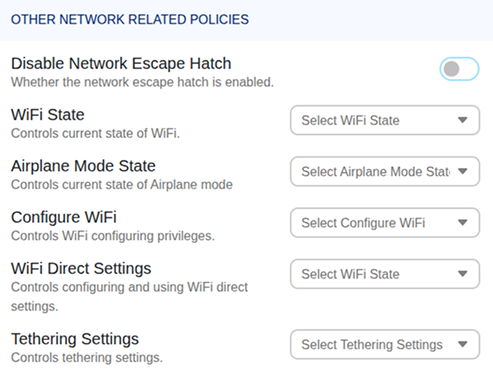
Disable Network Escape Hatch
Prevents Android users from bypassing network restrictions configured in the policy. The network escape hatch is a built-in Android feature that allows temporary connection to an unsecured network when the device cannot reach the management server — disabling it ensures your restrictions are always enforced without exception.
Wi-Fi State
- Always On — Wi-Fi is forced on at all times. The user cannot disable it. Recommended for Android devices that must remain on the corporate network constantly.
- Always Off — Wi-Fi is forced off entirely. Use for devices that should only use mobile data.
- User Choice — The employee can enable or disable Wi-Fi freely. Standard Android device behavior.
Airplane Mode State
- Off — Airplane Mode is permanently disabled. The Android device cannot be switched to airplane mode, ensuring it always maintains network connections and remains reachable by the MobiHeal console.
- User Choice — The employee can enable or disable Airplane Mode freely.
Tethering Settings
- Allow Tethering — The Android device can be used as a portable hotspot or USB tether. Use only where this is an approved business requirement.
- Disallow Tethering — The device cannot share its internet connection under any circumstances. Recommended for most corporate deployments.