Introduction to iOS BYOD
Bring Your Own Device (BYOD) allows employees to use their personal iPhones and iPads for work without requiring a separate company-issued device. Apple's User Enrollment framework enables organizations to securely manage corporate applications, accounts, and data while preserving employee privacy. With MobiHeal, organizations can deploy work resources to personal Apple devices while ensuring that personal apps, photos, messages, and other private content remain inaccessible to IT administrators.
What is BYOD on iOS?
BYOD (Bring Your Own Device) is a device management approach that allows employees to use their personally owned iPhones and iPads for work-related tasks. Instead of managing the entire device, the organization manages only corporate resources while leaving the employee's personal data untouched.
- Employees use a single iPhone or iPad for both personal and business activities.
- Organizations deploy and manage corporate apps, accounts, and configurations without controlling the entire device.
- Personal apps, photos, messages, and files remain private and inaccessible to administrators.
- Employees retain ownership and full control of their personal devices.
What is Apple User Enrollment?
User Enrollment is Apple's privacy-focused enrollment method designed specifically for employee-owned devices. It allows MobiHeal to manage business data separately from personal data while maintaining a clear boundary between corporate and personal content.
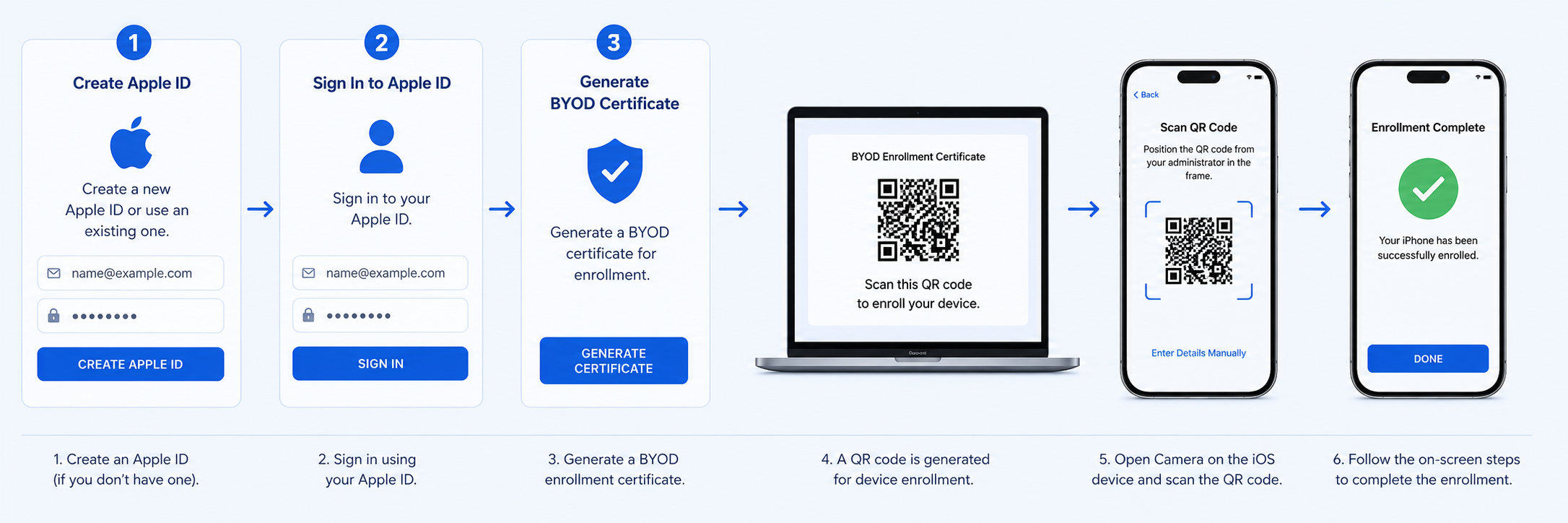
- Corporate apps and managed accounts are separated from personal data.
- Organizations can apply policies only to managed applications and work resources.
- A Managed Apple Account can be used for business services and applications.
- Employees maintain privacy while organizations secure corporate information.
- The organization can remove corporate resources without affecting personal content.
When to Use BYOD Management
- Remote Workforce — Employees access email, collaboration tools, and business applications from their personal iPhones.
- Sales Teams — Sales representatives use their own devices while securely accessing CRM and business resources.
- Consultants & Contractors — Temporary workers can securely access corporate applications without receiving company-owned devices.
- Hybrid Work Environments — Employees work both remotely and in the office using their preferred Apple devices.
- Educational Institutions — Staff members use personal iPads or iPhones while accessing managed educational resources.
- Small & Medium Businesses — Organizations reduce hardware costs by allowing employees to use their existing Apple devices.
BYOD vs Corporate-Owned Apple Devices
- BYOD (User Enrollment) — The organization manages only corporate apps, accounts, and business data. Employees retain privacy and ownership of the device. Best for employee-owned iPhones and iPads.
- Corporate-Owned (Supervised Devices) — The organization manages the entire device, including restrictions, configurations, apps, and security controls. Best for company-issued Apple devices.
If the device belongs to the employee, User Enrollment is the recommended enrollment method. If the organization owns the device, Supervised Device Management should be used for complete administrative control.
Apple Management Modes for Employee-Owned Devices
User Enrollment
The standard BYOD management mode for Apple devices. MobiHeal manages only corporate resources while protecting user privacy. Employees can continue using their devices normally while business data remains secured and managed separately.
Account-Driven User Enrollment
A streamlined enrollment experience that allows employees to enroll their personal devices using corporate credentials. The enrollment process automatically provisions managed accounts, applications, and policies while maintaining Apple's privacy protections.
Why Manage BYOD Devices with MobiHeal
- Privacy-first management — Corporate resources are managed without accessing personal data.
- Secure app deployment — Business applications can be distributed directly to enrolled users.
- Remote removal of work data — Corporate apps and data can be removed without affecting personal content.
- Policy enforcement — Security settings and compliance policies are applied to managed resources automatically.
- Simplified enrollment — Employees can quickly enroll personal Apple devices with minimal setup effort.
- Compliance visibility — Administrators can monitor enrollment status, managed apps, and policy compliance from the MobiHeal console.
- Reduced hardware costs — Organizations support mobile workforces without purchasing dedicated devices for every employee.