Introduction to Corporate-Owned iPhone & iPad Management
Corporate-Owned iPhone and iPad Management allows organizations to fully manage Apple devices that are purchased, owned, and issued by the company. Unlike BYOD enrollment where employees use personal devices, corporate-owned Apple devices are enrolled as supervised devices, giving administrators enhanced control over device settings, applications, security policies, and corporate resources. With MobiHeal, organizations can securely deploy, configure, monitor, and manage company-owned Apple devices throughout their entire lifecycle.
What is a Corporate-Owned Apple Device?
A corporate-owned Apple device is an iPhone or iPad that is purchased and assigned by the organization for business use. These devices are enrolled into MDM and supervised to provide advanced management capabilities and stronger security controls.
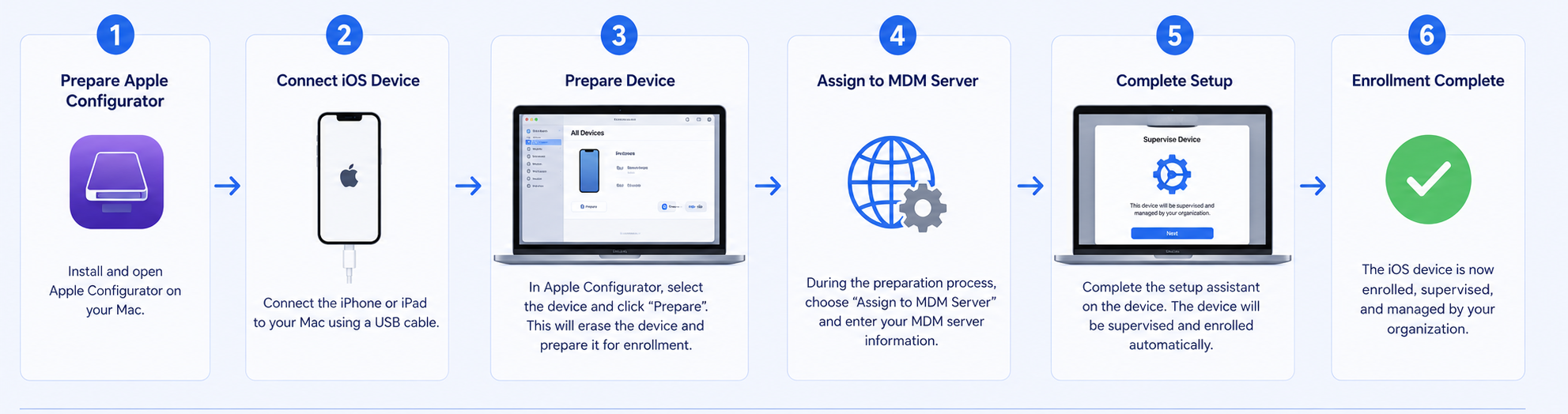
- Organizations retain ownership and administrative control of the device.
- IT administrators can manage device settings, applications, and security policies remotely.
- Corporate applications can be deployed, updated, and removed centrally.
- Devices can be locked, reset, or wiped remotely when required.
- Supervision enables enhanced management capabilities not available on personal devices.
What is Supervised Device Management?
Supervised Device Management is Apple's enhanced management mode for organization-owned devices. When a device is supervised, MobiHeal gains access to additional management capabilities that help organizations secure and control corporate assets while simplifying administration.
- Advanced restrictions and security controls can be enforced.
- Corporate applications can be installed and managed centrally.
- Network configurations such as Wi-Fi and VPN can be deployed automatically.
- Device settings can be standardized across the entire fleet.
- Lost or stolen devices can be remotely secured or wiped.
When to Use Corporate-Owned Device Management
- Field Operations — Company-issued iPhones used by field technicians, service engineers, and mobile workers.
- Sales Teams — Corporate devices configured with business applications, CRM tools, and communication platforms.
- Retail & Point of Sale — iPads deployed at checkout counters, kiosks, and customer service locations.
- Healthcare — Supervised devices used by healthcare professionals with strict compliance and security requirements.
- Education & Training — Shared or dedicated iPads deployed for learning and training environments.
- Office Staff — Corporate-owned iPhones and iPads used for email, collaboration, and business applications.
Corporate-Owned Devices vs BYOD
- Corporate-Owned (Supervised Devices) — The organization manages the entire device, including applications, settings, restrictions, security controls, and corporate resources. Best for company-issued iPhones and iPads.
- BYOD (User Enrollment) — The organization manages only corporate resources and managed applications while preserving employee privacy. Best for employee-owned devices.
If the organization owns the device, Supervised Device Management is the recommended enrollment method. If the device belongs to the employee, User Enrollment should be used to maintain personal privacy.
Apple Management Modes for Corporate-Owned Devices
Supervised Device Management
The standard management mode for company-owned Apple devices. MobiHeal manages the device using Apple's supervision framework, allowing administrators to deploy applications, configure settings, enforce security policies, and maintain compliance across all managed devices.
Automated Device Enrollment
A streamlined enrollment method integrated with Apple Business Manager that automatically enrolls devices into MDM during activation. Devices receive corporate configurations, applications, and policies without requiring manual setup by IT administrators.
Why Manage Corporate-Owned Devices with MobiHeal
- Automated enrollment — Devices can be enrolled automatically during initial setup using Apple Business Manager.
- Remote app deployment — Corporate applications can be distributed and updated remotely.
- Centralized policy enforcement — Security settings, restrictions, Wi-Fi, VPN, and compliance policies are applied automatically.
- Remote troubleshooting — Devices can be locked, wiped, or reconfigured without physical access.
- Fleet visibility — Administrators can monitor device status, compliance, battery information, and inventory details from a single console.
- Enhanced security — Corporate data remains protected through supervision, policy enforcement, and centralized management.
- Scalable management — Manage large fleets of company-owned iPhones and iPads from a unified MobiHeal dashboard.